
Getting started with the ScalePad API
Authentication
Authenticate ScalePad API calls using the x-api-key header.
Example request
GET https://api.scalepad.com/core/v1/clients HTTP/1.1
accept: application/json
x-api-key: <API_KEY>
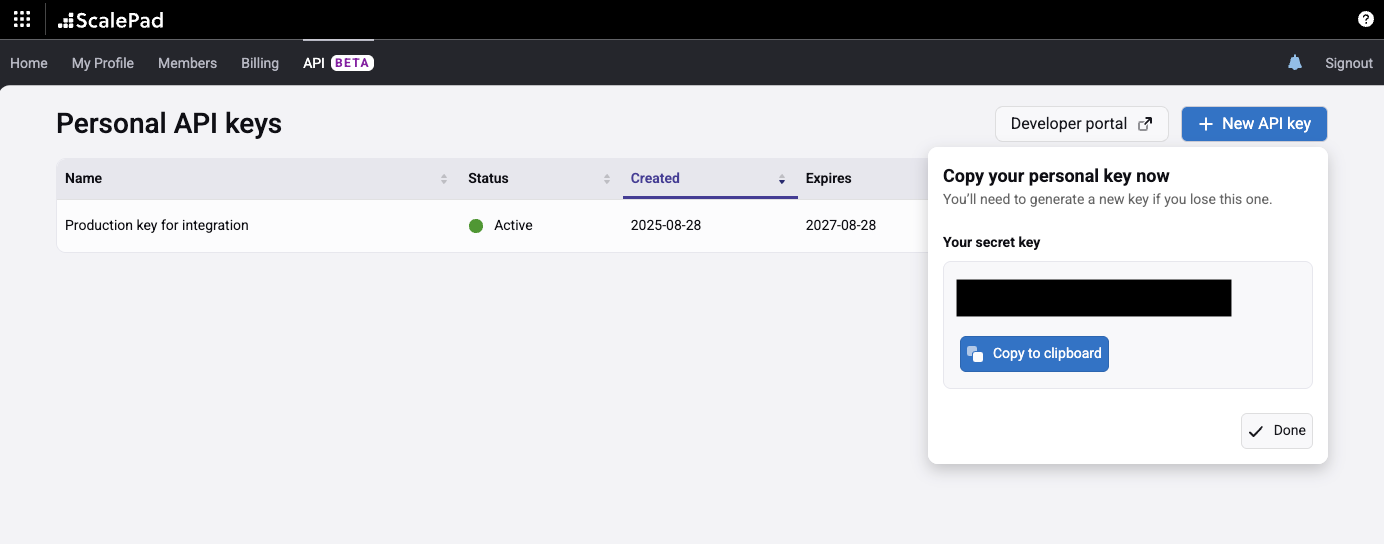
Replace API_KEY with the API key generated in the ScalePad application. API keys follow this format:
c4d67eca-3b32ed26-b2412e47-2f634617-7e91a0f4-5c8d2b67-e3a19f0b-46d7c582Creating a personal API key
User requirements
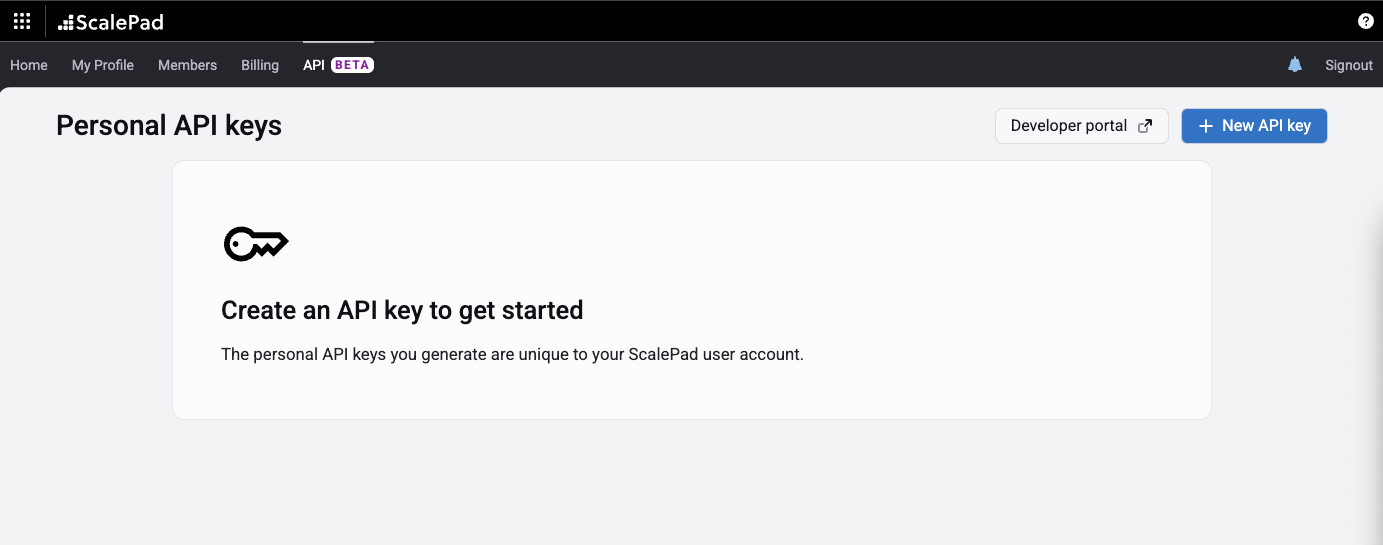
A ScalePad user must be active and have the Administrator permission to view the API tab and use API keys. If a user is deactivated or loses the Administrator permission, their API keys will stop working.
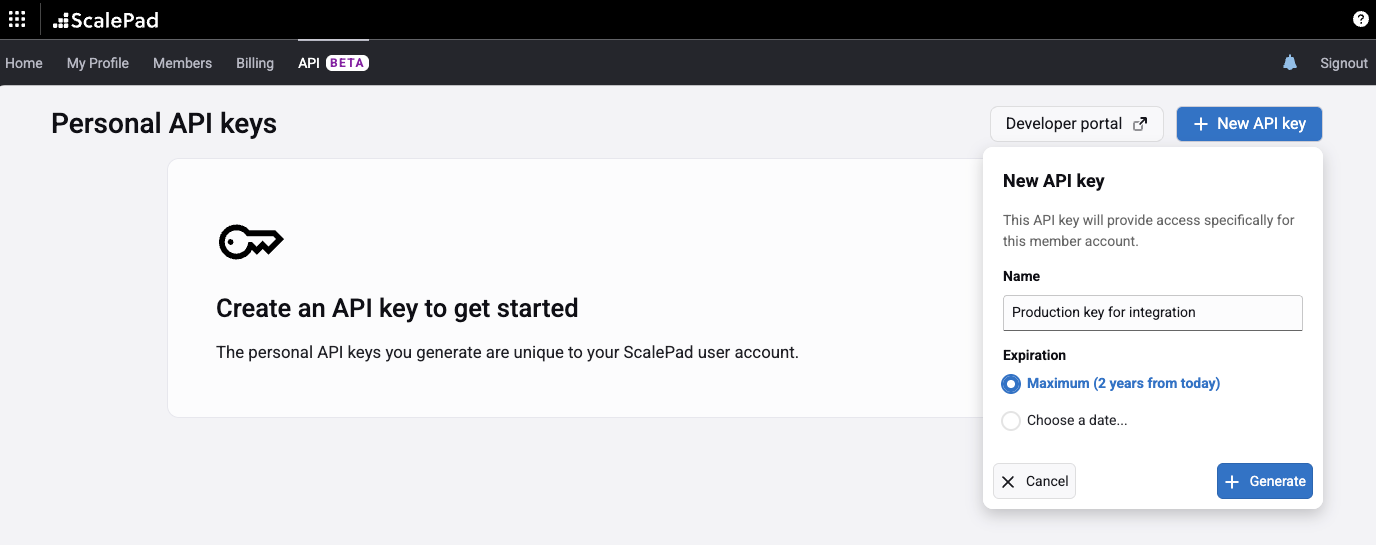
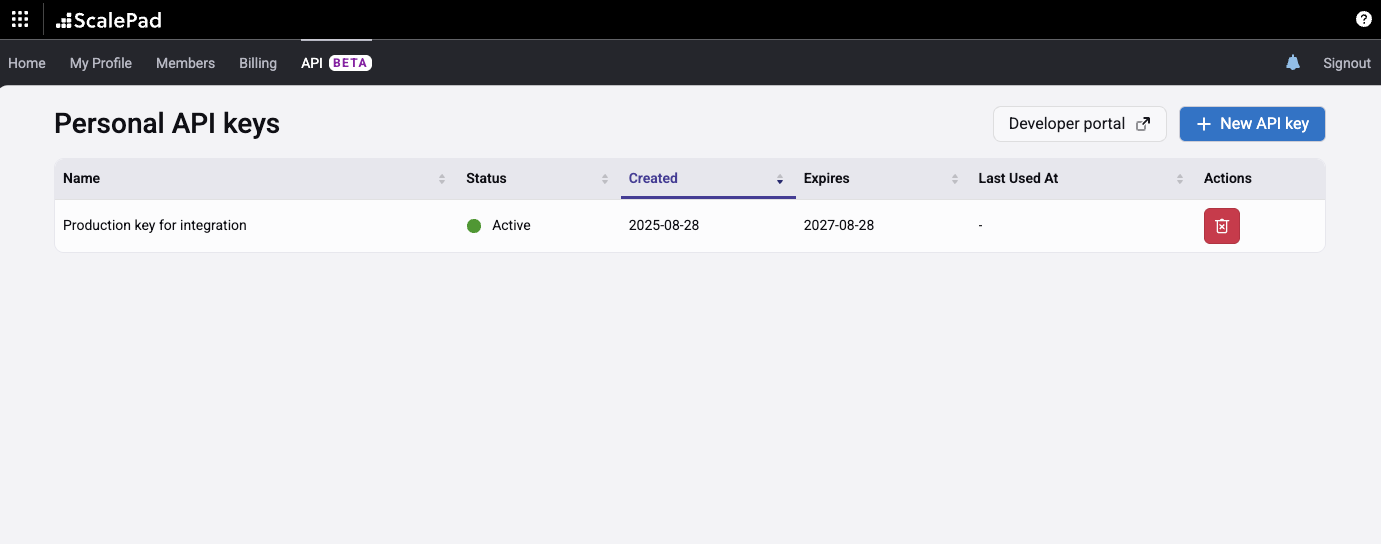
Generating a key
Rate limiting
429 response with a Retry-After header.If you exceed the rate limit, the API will return a 429 response:
HTTP/1.1 429 Too Many Requests
Retry-After: 23

Too Many Requests
The Retry-After header indicates how long to wait (in seconds) before making a follow-up request.
HTTP response codes
ScalePad API uses standard HTTP response codes.
Pagination
ScalePad API endpoints use cursor-based pagination.
Due to the nature of cursor-based pagination, results are not guaranteed to be atomic across pages. Records created or updated during pagination may be skipped, and in rare cases the same record may appear on more than one page. These behaviours are expected and should be anticipated by API consumers.
page_sizeNumber of records to return per pagecursorPointer used to fetch a specific page of recordsdataArray of records returned by the querytotal_countTotal count of all matching recordsnext_cursorPointer to the next page (present only when more records exist)Example request
{
  "page_size": 100,
  "cursor": "WyI1Y2IyNGI2ZS0wNz"
}
Example response
{
  "data": [],
  "total_count": 1,
  "next_cursor": "kLTRkMDItODI0NC01ZDI4"
}
Example URL
GET https://api.scalepad.com/core/v1/clients?page_size=200&cursor=WyIwMDVlNTg0OTkFiltering
ScalePad API endpoints may offer filtering based on field values. Filterable fields are documented on each endpoint.
Filtering uses the filter keyword, indexed by the field name, followed by an operator and value.
Operators
If the operator is omitted, it defaults to eq. For example, filter[type]=eq:WORKSTATION and filter[type]=WORKSTATION are equivalent.
Combining filters
Multiple filters are evaluated as an AND condition.
filter[type]=eq:WORKSTATION&filter[client_id]=eq:2220324Date formats
Date fields should match the format of the field being filtered. Date-time fields can often be filtered as a date as well.
filter[record_updated_at]=lte:"2020-03-04T00:00:00.000"
filter[record_updated_at]=gt:"2022-05-07"
Special tokens
Strings containing any of the following tokens must be wrapped in double quotes:
,filter[name]=eq:"Space Sprockets, Inc.":filter[name]=eq:"Acme: Division"(space)filter[name]=eq:"My Company"Nested filters
Filters support nested properties using . notation.
filter[configuration.ram_bytes]=lte:8000000000
filter[software.antivirus_info.status]=eq:RUNNING
Sorting
ScalePad API endpoints offer sorting by ascending or descending order on supported fields. Sortable fields are documented on each endpoint.
The sort parameter is sort or sort_by depending on the endpoint.
Operators
sort=+num_hardware_assetssort=-num_hardware_assetsIf no operator is specified, ascending order is used by default.
Combining sorts
Multiple sort fields can be specified using a comma delimiter.
sort=num_hardware_assets,-num_contactsRich text fields
Some ScalePad API fields accept rich text content in ProseMirror JSON format.
{"type":"doc","content":[...]}docRoot document node. Must wrap all content.requiredparagraphStandard text paragraph.textAlign: left | center | right | justifyheadingSection heading.level: 1–4, textAlignbulletListUnordered list container.orderedListNumbered list container.start: numberlistItemIndividual list item.hardBreakLine break within a paragraph.bolditalicunderlinestrikelinkhref: URLleftcenterrightjustifyExample document
{
  "type": "doc",
  "content": [
    {
      "type": "heading",
      "attrs": { "level": 1 },
      "content": [{ "type": "text", "text": "Heading" }]
    },
    {
      "type": "paragraph",
      "attrs": { "textAlign": "left" },
      "content": [
        { "type": "text", "text": "Normal " },
        { "type": "text", "marks": [{ "type": "bold" }], "text": "Bold" },
        { "type": "text", "text": " " },
        { "type": "text", "marks": [{ "type": "italic" }], "text": "Italic" },
        { "type": "text", "text": " " },
        {
          "type": "text",
          "marks": [{ "type": "link", "attrs": { "href": "https://example.com" } }],
          "text": "Link"
        }
      ]
    },
    {
      "type": "bulletList",
      "content": [
        {
          "type": "listItem",
          "content": [
            { "type": "paragraph", "content": [{ "type": "text", "text": "Bullet item" }] }
          ]
        }
      ]
    }
  ]
}
Errors
ScalePad API endpoints return a standardized error structure (except 429 Too Many Requests):
{
  "errors": [
    {
      "code": "UNAUTHORIZED",
      "title": "No API credentials",
      "detail": "No API credentials were provided. Please check your API credentials are sent in the header 'x-api-key' or review the API documentation."
    }
  ]
}errorsArray of error objectserrors[].codeString indicating the error typeerrors[].titleShort description of the errorerrors[].detailDetailed description with possible resolution stepsEndpoint documentation
You can find the full documentation for all available ScalePad API endpoints under the API Reference tab.
Updated about 2 months ago